Essential Tools for UX Designers
Professional UI Templates

Tools for UX Designers
GanttPRO
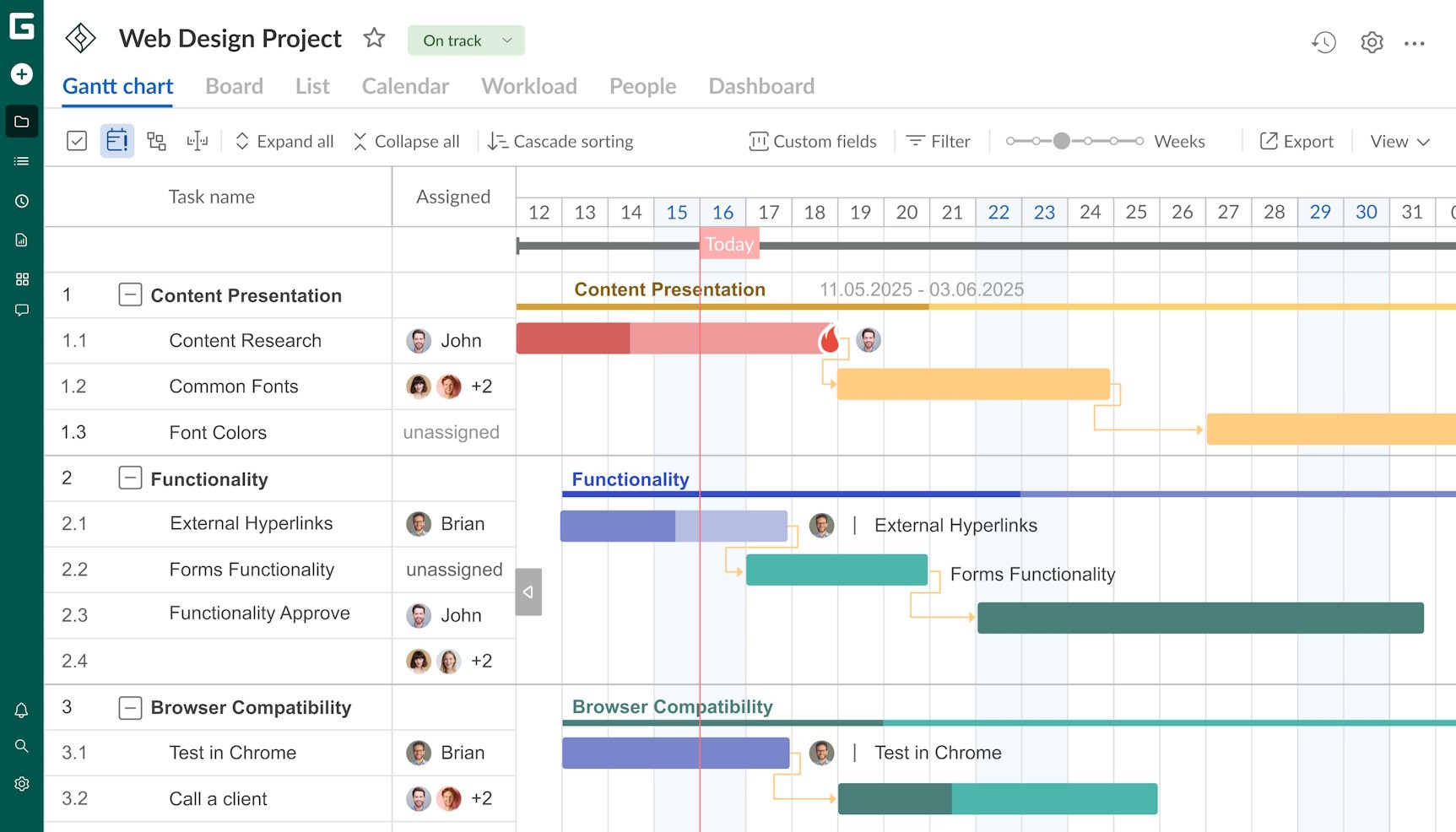
Gantt-style timelines are great to turn scattered tasks into a single, readable roadmap that anyone on the team can follow.
GanttPRO lays everything out in a linear, intuitive format. That’s valuable when you have multiple design tracks and version updates pile up.
Figma
The introduction of Figma has reshaped how designers collaborate and create. Being web-based, you simply log in using a machine of your choice from anywhere and continue working without missing files or version mismatches.
Collaboration is at its strongest with Figma. Multiple designers can move through the same file at once without stepping on each other’s work. Components stay organized and updates are quickly synced across entire systems. Designers can simply jump from drawing screens to wiring interactions in one environment to keep momentum steady.
Fronty
Fronty is a great option for designers who need a bridge between visuals and front-end code. Simply upload a design, and Fronty will transform it into HTML/CSS. What you get is a clean, editable code so that your developers don’t have to spend hours rebuilding layouts from scratch.
For smaller teams and for teams that are pushing fast towards quick MVPs or iterative releases, this can be quite helpful.
Magician Design
Magician Design works inside design workflows to generate UI elements, illustrations, and animation concepts. It really becomes a brainstorming partner for designers under tight deadlines. Instead of staring at a blank canvas on the screen, these can spark ideas instantly and you can refine it from there. Note that this does not replace creative thinking. Think of it as a catalyst. Magician trims the slow parts of the ideation and keeps teams moving.
Sketch
A Mac-focused classic for interface work, Sketch has built its reputation over the years on speed and clarity. It does a good job of stripping away any unnecessary bulk and gives you a focused environment for interface design. Sketch’s vector tools feel clean and responsive which can be super helpful when refining layout or even building icon sets.
The community is also quite active. Multiple plugins help fill many specialized needs. Teams can tailor the tool to fit their preferred workflow and thanks to shared libraries, they can also now be consistent across projects. The learning curve is gentle but never hinders your workflow.
Balsamiq
If you love the feeling of sketching ideas on a whiteboard from scratch, this one’s for you. Balsamiq lacks the polish of most modern tools. But that’s for a reason. A minimalist approach helps designers focus on structure and intent and helps teams test early concepts without falling into the trap of refining details too early.
The drag and drop library speeds up the process. Screens come together in minutes, not hours.
Product managers often gravitate toward Balsamiq because its simplicity is great for fast iteration and clear communication. When a team needs quick validation without the weight of visual design, Balsamiq brings you a clear path.
Visily
Don’t have dedicated designers but still need strong product thinking? Visily is here for you. AI-powered suggestions help generate wireframes and prototypes from simple inputs, which cuts down the time spent figuring out structure.
The tool encourages collaboration across departments. Templates speed up decision-making. For early-stage ideas, Visily is great at removing friction and pulling people into the design process who would normally stay on the sidelines.
Axure RP
Some projects call for more than static screens. What they need is logic, adaptive views, and scenarios with conditions that shift based on user behavior. With Axure RP, designers can create prototypes that behave like functional applications. Variables, branching flows, and everything else can be shaped inside one file. This is quite helpful for teams to validate ideas before handing it over to the developers for the next stage.
Axure also has good support for documentation inside the same workspace. Teams can package specifications along with prototypes to give developers comprehensive context. When a product requires high-detail exploration, Axure keeps the heavy lifting manageable.
Bonus Tools
Uizard
Uizard is great at reading hand-drawn wireframes and turning them into digital prototypes. It compresses the gap between brainstorming and testing. Plain sketches transform into workable prototypes the same day, thanks to the drag and drop interface that keeps things approachable.
Khroma
Khroma learns your taste and produces color palettes based on those patterns. This does not pull colors from a random generator. Instead, designers get suggestions grounded in their actual style for a more tailored approach.
VisualSitemaps
VisualSitemaps crawls websites and generates complete visual maps of every page to help you understand an entire site’s structure in minutes. This is a huge timesaver for audits or redesigns.
Neuron
Neuron is great at predicting how users might react to layout choices. It is done by analyzing attention patterns and cognitive load. Eye-tracking simulations paint a picture of how people scan a page. This high level of prediction allows designers to see potential friction points before launch.
Maze
Maze is a great tool to connect prototypes to real users for immediate feedback. Designers are able to test flow, measure task success, and identify friction points quickly. Instead of waiting for full development, teams validate ideas early and adjust.
Whimsical
Think Whimsical when you need powerful visual thinking without chaos. Get a neat zone for brainstorming. Leverage mind maps, wireframes, and flowcharts all in one place for real-time collaboration to keep teams close, even when working remotely.
Appy Pie AI UI Generator
Appy Pie’s generator uses AI to build interface components quickly. Anyone can produce usable UI layouts without touching code. For rapid project cycles, this kind of acceleration helps teams meet deadlines without losing structure.
Choose Your Tools Wisely
Every tool in this list is unique in its function. When put together, they create a workflow that enables designers to get from their initial sketches to the final user-friendly experiences.
Use these tools interchangeably depending on the workflow of your team and make your tech stack decisions carefully.
Disclaimer : If you buy something through our links, we may earn an affiliate commission or have a sponsored relationship with the brand, at no cost to you. We recommend only products we genuinely like. Thank you so much.

Write for us
Publish a Guest Post on Pixflow
Pixflow welcomes guest posts from brands, agencies, and fellow creators who want to contribute genuinely useful content.
Fill the Form ✏