Checkout Champ subscriptions and Klaviyo: how to connect them, and the 5 emails that stop cancellations
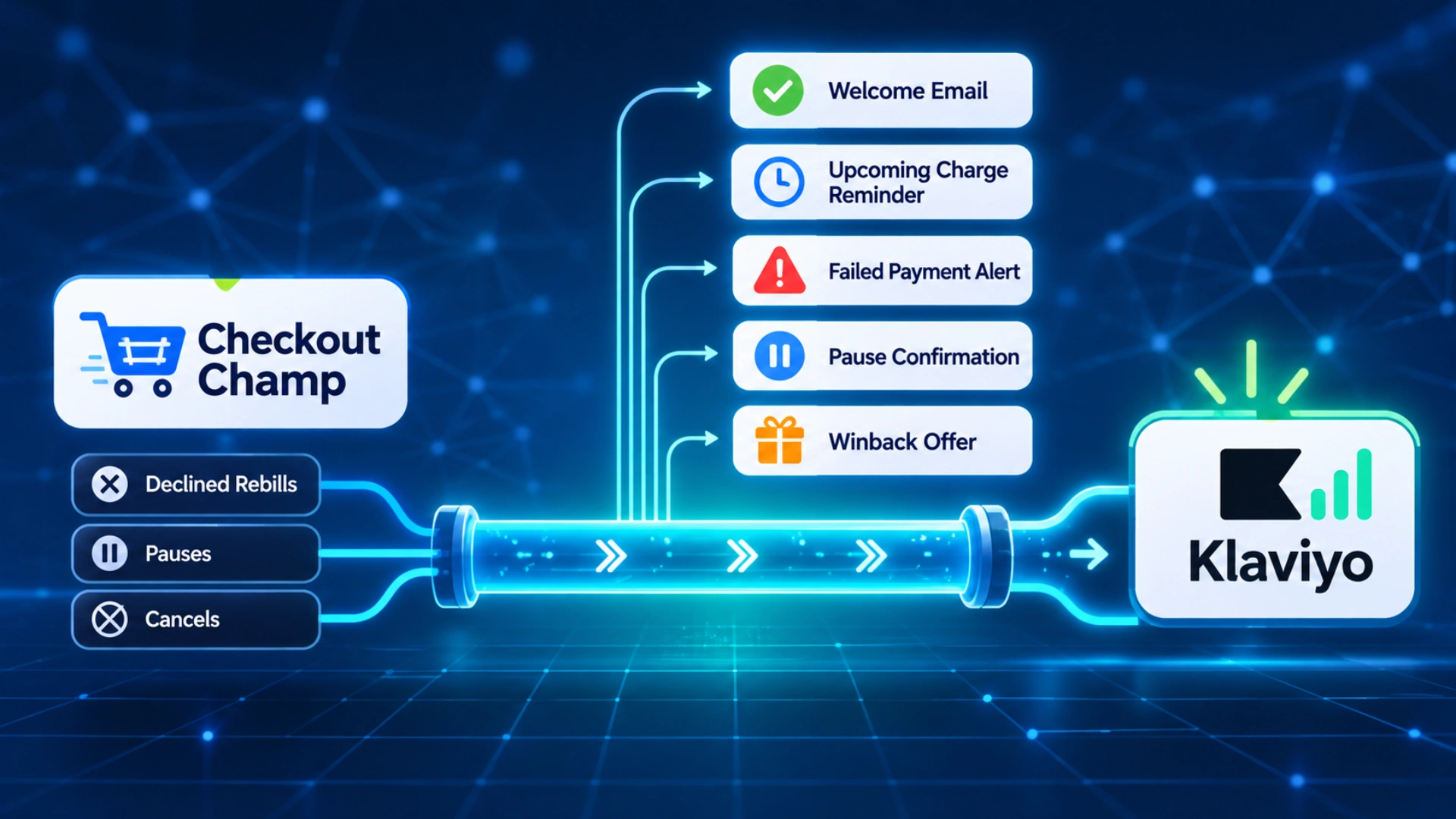
At Email Kong we work as a Checkout Champ Klaviyo agency for subscription brands, and this is the setup we use.
What does the Checkout Champ Klaviyo plugin send?
2 settings matter more than the rest for subscription brands.
- The rebill toggle. Successful rebills do not reach Klaviyo by default. Placed Order fires for the first sale only until you tick “Send Placed Order Event For Successful Rebills” and add a Rebill Success route. With it off, flow revenue looks lower than it is.
- OrderType. Placed Order carries an OrderType field. NEW_SALE means a first order and RECURRING means a rebill. Filter your post-purchase flows on NEW_SALE, so a renewal doesn’t start them again.
What does the plugin not send?
| Subscription moment | In the Klaviyo plugin? | Where it lives in Checkout Champ |
|---|---|---|
| Upcoming charge | No | Pre-Billing postback |
| Rebill declined | No | Rebill Decline postback |
| Final failure after retries | No | Recycle Failed postback |
| Subscription cancelled | No | Cancel postback |
| Subscription paused | No | Pause postback |
| Subscription reactivated | No | Reactivate postback |
There is one trap here. The plugin’s Cancelled Order event fires when an order is cancelled in the CRM. It does not fire when a customer cancels their subscription, so you can’t build a winback flow on it.
How do you get subscription events into Klaviyo?
The triggers that matter for subscriptions are Subscription Started, Pre-Billing, Recurring Order, Rebill Decline, Recycle Failed, Cancel, Pause and Reactivate.
If you point postbacks straight at Klaviyo, these are the problems that show up a week later:
- Duplicates. Checkout Champ resends a postback until it gets a success response. If the first one landed but the response timed out, the subscriber gets 2 failed payment emails. Every event needs a stable ID so Klaviyo keeps only the first copy.
- Missing fields. The postback fields have no next bill date and no portal link. A reminder email without the date is half an email, so these have to be looked up and added.
- Other brands leaking in. Many Checkout Champ accounts hold more than one brand. If the routing is set to all campaigns, another brand’s cancels land in your Klaviyo and your flows email their customers.
- Revenue counted twice. Only events where money moved, like Subscription Started and Recurring Order, should carry a value.
- A short delay. Checkout Champ sends postbacks in runs roughly every 15 minutes, so don’t promise an instant SMS on a decline.
Test with a real low-value order, because Test Card orders don’t export through postbacks.
Which 5 emails stop cancellations?
1. The new subscriber welcome
Trigger: Subscription Started, or Ordered Product where ItemType is RECURRING. Filter on OrderType NEW_SALE so renewals don’t restart it.
Tell the customer they are on a subscription, when the next order ships and how to get the most from the product. Buyers from a funnel offer may not have noticed they subscribed, so say it clearly in week 1.
2. The reminder before each charge
Trigger: the Pre-Billing postback, or the next bill date stored on the Klaviyo profile. We use the date and clear it when someone cancels or pauses, so the reminder stops by itself. Note the Pre-Billing postback only fires after Checkout Champ has sent its own pre-bill notification.
Send it 3 to 5 days before a monthly rebill and 5 to 7 days before longer intervals. Always send one before the first rebill after a trial or funnel offer. Include the date, the amount and what’s in the box. Leave out a “manage subscription” button, because the portal is where people cancel. Changes go through a reply to support.
3. The failed payment email
Trigger: Rebill Decline. Exit: any Recurring Order, Cancel or Reactivate. Turn Smart Sending off so a campaign the day before doesn’t block it.
Send the first email a few hours after the decline with one button that opens the update-card page in the customer’s Checkout Champ portal. Time the next emails to land before Checkout Champ’s recycle billing retries, so a new card is on file when the charge runs. Write to the decline reason. A soft decline like insufficient funds needs a calm note and no discount. A hard decline like an expired card needs the button first. Recycle Failed gets the last email: the subscription is on hold until the card is updated.
4. The paused subscriber email
Trigger: Pause. Exit: Reactivate.
A paused subscriber hasn’t left. We send 3 emails with a resume button that opens the right page in the Checkout Champ portal, and keep any offer for the last one. Checkout Champ has no Skip trigger, so pause also does the job a skip would do on other platforms.
5. The winback after a cancel
Trigger: Cancel. Exit: Reactivate or any Placed Order. Filter to the brand’s own campaigns.
We run 3 emails over about 30 days and give each one a single job. Around day 10, a plain text note from the founder asking what went wrong. Around day 20, proof: a result or a real review. Around day 30, one clear restart offer with a reactivate button. The Cancel postback carries a cancel_reason, so once you group the reasons you can lead with pause for “too much product” and with price for “too expensive”.
What should you switch off before going live?
Then measure what the flows save: rebills recovered after a decline, cancelled subscribers who reactivate, and chargebacks before and after the reminder goes live. That is the core of subscription retention on any platform, and on Checkout Champ it starts with getting the events into Klaviyo.
Disclaimer : If you buy something through our links, we may earn an affiliate commission or have a sponsored relationship with the brand, at no cost to you. We recommend only products we genuinely like. Thank you so much.
Blog Label:
Write for us
Publish a Guest Post on Pixflow
Pixflow welcomes guest posts from brands, agencies, and fellow creators who want to contribute genuinely useful content.
Fill the Form ✏