The Micro-Story Hack: How Animated Photos Turn Curiosity Into Clicks Before The Big Reveal
The Micro-Story Hack: How Animated Photos Turn Curiosity Into Clicks Before The Big Reveal
Timing is everything in marketing, and less is sometimes more. Marketers tend to rush to display full videos for any upcoming product launch, trailer release, or YouTube premiere much too quickly. Because consumers are scrolling through endless content, they barely ever stop on a long clip unless they’re already invested. This is why one of the most powerful pre-launch hacks has been to create mystery with simple photos through animated teaser loops that don’t give anything away. Using tools like Pippit, creators can make a teaser loop in minutes. With its intuitive AI video editor, Pippit takes a still image and turns it into a soft motion sequence of images that makes viewers pause, analyze, and anticipate what’s coming next.
pippit ai logo
The beauty of this strategy is in its restraint. Instead of dropping the entire campaign at once, you drop the tension. A single image where the lighting pulses softly. A product silhouette emerging from darkness. A model whose eyes shift just enough to feel alive. These micro-animations act like whispers: “Something is coming.” Audiences love whispers. They follow them. They click them. They remember them.

Why Animated Teasers Beat Early Full Videos

If you put out a full video too early, you burn up all the novelty before the campaign even launches. But an animated photo does not overwhelm the viewer; it charms through simplicity and teases that there is so much more behind it. This is a great example of contrast between stillness and motion working directly into curiosity psychology: people recognize the structure of a photograph, so when it moves subtly, they pay extra attention.

Animated teasers have no need for scenes, scripts, or transitions. Where they excel is in the moment right before the reveal.

Mystery over information

The key is not to reveal the story but to suggest a story is about to begin. For example, suppose you have a major YouTube release scheduled. Instead of giving away the intro shot, animate a single frame and let the lighting swirl around your silhouette. Add a one-word clue: “Tomorrow.” You instantly shift from information mode to mystery mode. Mystery triggers speculation; speculation drives attention.

Where micro-stories generate the most anticipation

Teasers in animated format perform best in environments where short-form attention is king. Everything from Instagram Reels and TikTok loops to YouTube Shorts and Stories rewards visuals that move just enough to feel alive but not enough to give anything away. These are all platforms with autoplay motion, meaning your teaser stands out instantly compared to static posts. However, animated photos also perfectly fit in email campaigns, landing pages, product waitlists, and even the headers of digital storefronts.

These teasers can be distributed far and wide because they’re light, small, and visually clean. A single motion-enhanced image can be reformatted into square posts, vertical loops, banner animations, and subtle GIFs. Each version says the same thing: “Pay attention. Something exciting is coming.”

Testing possibilities by low-risk experimentation

One major benefit of animated photos is creative flexibility. You test styles, moods, and tones before going into full-production video shoots. Want to try a neon aesthetic? Animate a glowing highlight around the product. Want a moody vibe? Add drifting shadows or soft depth pulses. Since you need only one photo, you can do as many experiments as you like. A photo to video AI free tool makes this even easier, giving creators room to refine narrative direction before finalizing campaign visuals.

Shaping miniature narratives: Creating teaser-style animations with Pippit.

Converting still images to micro-stories can be easy if the tool is built for that. Pippit streamlines the whole process.

Step 1: Upload your images

Log in to Pippit, open the workspace Video generator, and click Add media. Choose images from your device/cloud storage or paste a product link. Click Generate, and let Pippit detect focal details and prepare the base for your animated teaser.

uploading image onto pippit ai

Step 2: Making customizations and generating

Pippit builds a preview showing motion elements drawn from the image. Adjust highlights, lighting swells, or subtle movements to match your campaign tone. Choose a video type and set the essentials: AI avatar, voice, aspect ratio, duration, and language. Then hit Generate to produce your teaser.
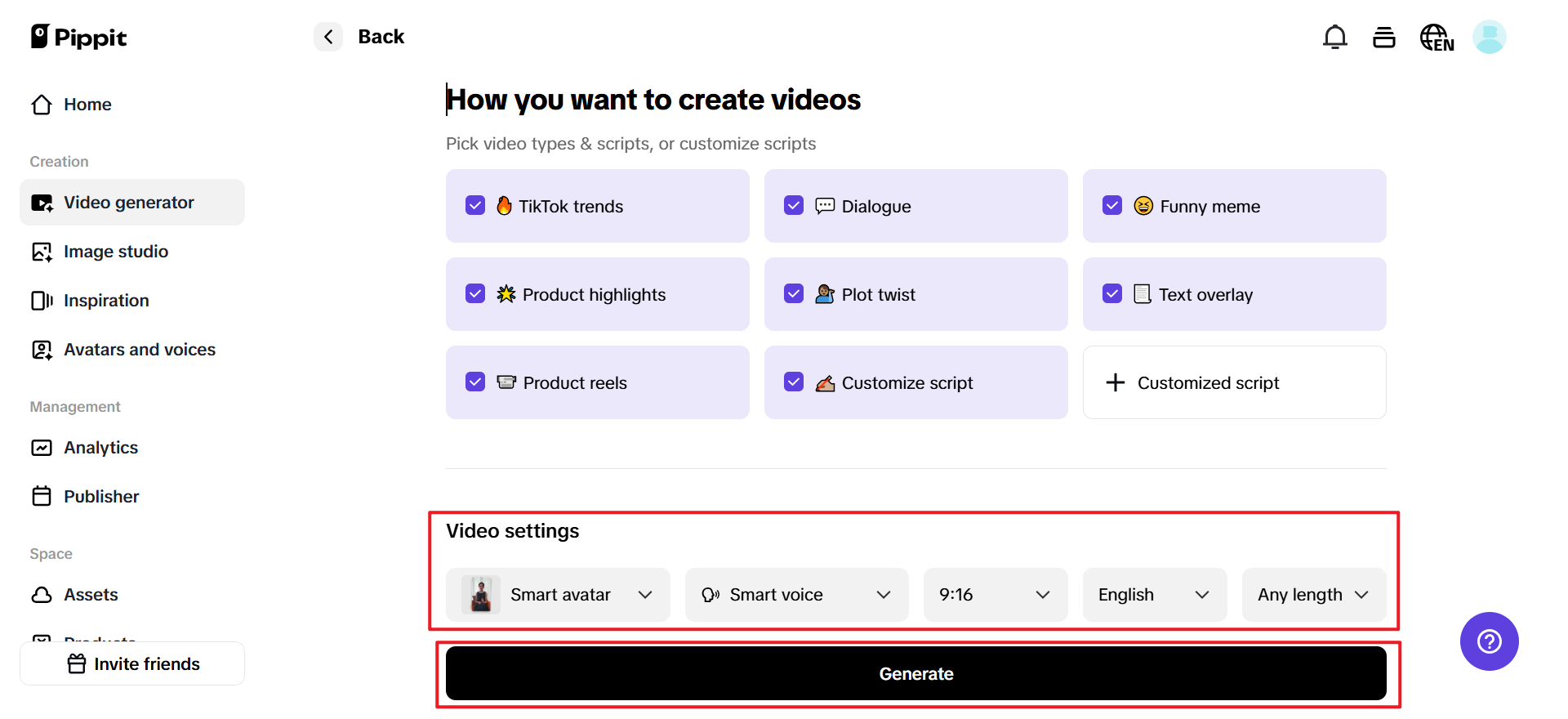
customizing the uploaded image on pippit ai

Step 3: Export the video

Preview the animation, and use Quick edit to refine captions, pacing, or stylistic details. Try out different motion styles until the teaser feels just right. And for deeper editing, click Edit more.
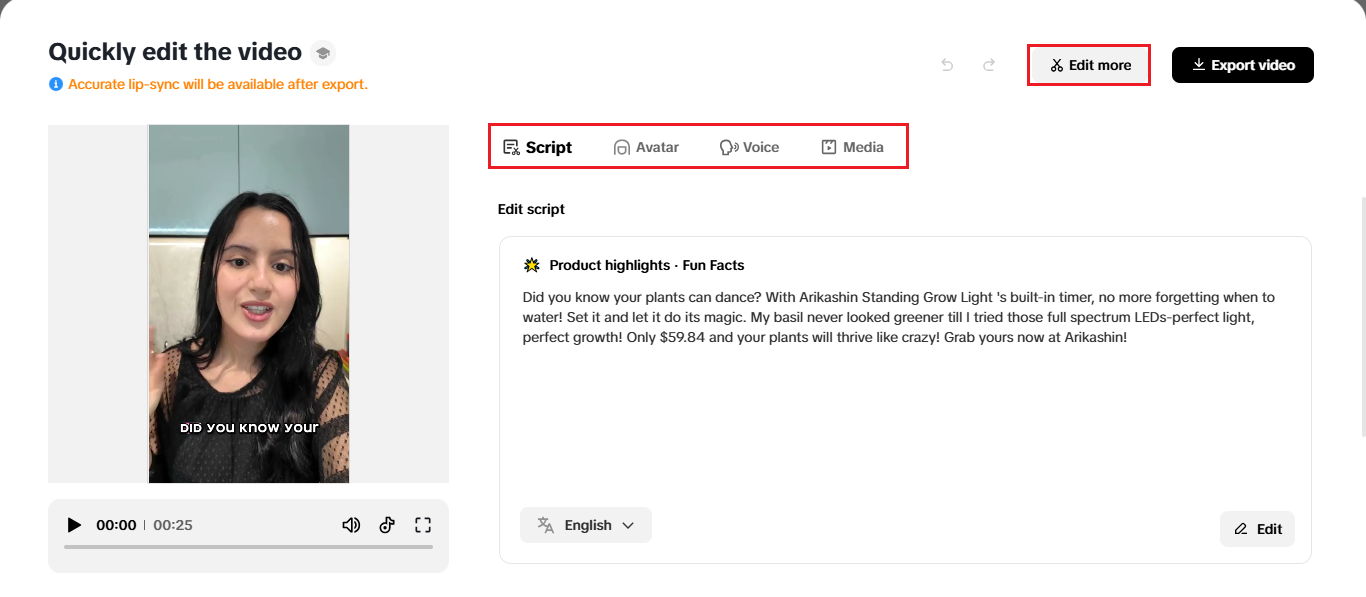
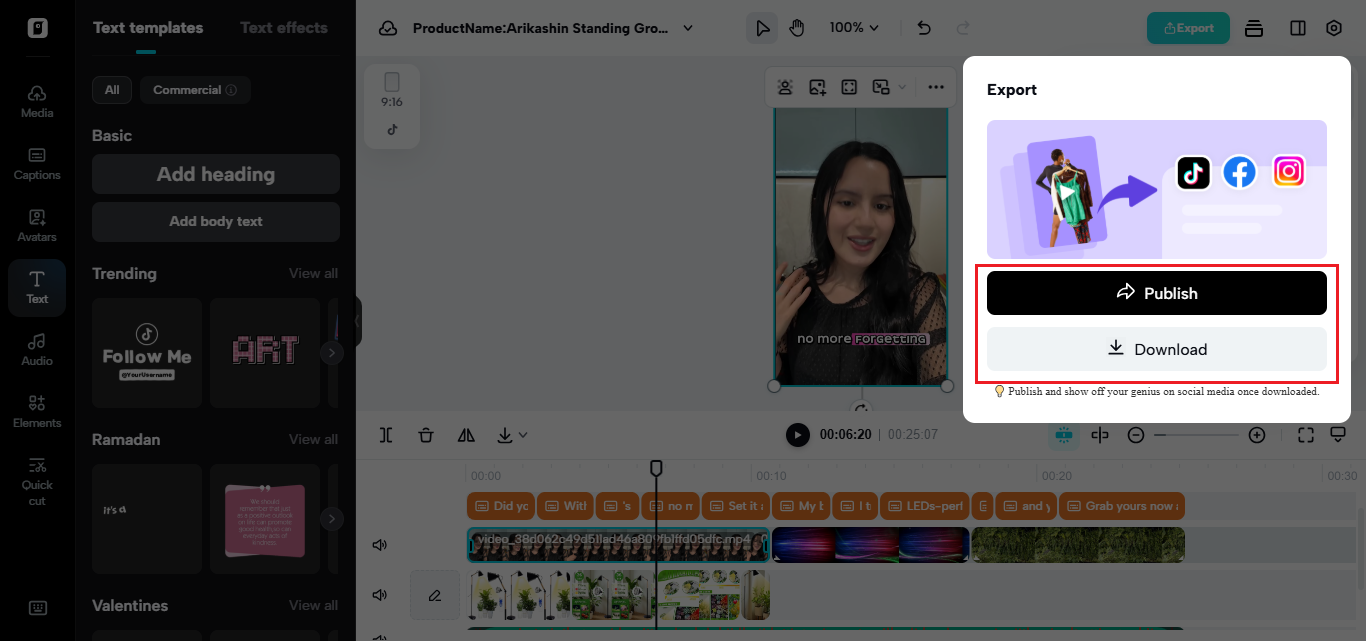
exporting video on pippit ai
When you’re happy, click Export and download a polished high-resolution teaser, ready for your posts, emails, or launch pages.
downloading a polished high-resolution teaser video on pippit ai

Turning curiosity into trackable clicks

Click-through rates rise when viewers feel they are discovering something, not merely being advertised to. Animated photos tap into that sensation. They feel like clues. And people love clues. Especially when they point toward something new.

Short teaser loops should end exactly at a point right before the “answer.” Freeze the motion on the product that’s about to show itself. If a model turns toward the camera, catch them mid-turn. If a shape comes out of the smoke, it fades out early. That incompleteness propels the viewers to your call-to-action. They click because they want the missing piece.

Visual polish makes teasers feel premium.

Teasers only work if they look aesthetically intentional. Blurry or low-resolution animations break immersion, making them feel like budget edits instead of atmospheric storytelling. Professional clarity is a must-have, especially for beauty, tech, and lifestyle brands. That’s where a free video enhancer refines the final output: sharpened highlights, smoother gradients, and clean colors make teasers high-end marketing assets that viewers take seriously.

The tease creates the tension-and tension creates the click

Campaigns don’t start with the reveal; they start with the hint. One animated photo can set the emotional tone for what comes next. And if you want to create an anticipation your audience can feel, then start building micro-stories with Pippit today and turn every still image into a moment worth waiting for.

Disclaimer : If you buy something through our links, we may earn an affiliate commission or have a sponsored relationship with the brand, at no cost to you. We recommend only products we genuinely like. Thank you so much.

Frequently Asked Questions

A micro-story teaser is a short, minimal piece of content (often a single image with subtle motion) that suggests a story without fully revealing it. It works by creating curiosity and tension, which makes people pause, speculate, and click to learn more.
Animated photo teasers tend to perform better early because they are simple, fast to consume, and designed to spark curiosity instead of giving away the payoff. Subtle motion in an otherwise familiar still image attracts attention in scrolling feeds, and the incomplete reveal motivates viewers to click for the full story.
Animated teaser loops work especially well on autoplay and short attention platforms like Instagram Reels, TikTok, YouTube Shorts, and Stories. They also perform strongly in email headers, landing pages, waitlists, and product pages because the lightweight motion draws attention without requiring a full video watch.
A typical workflow is to upload a still image, let the tool detect focal areas, choose a motion style (such as subtle lighting pulses or drifting shadows), and generate a short loop. Then refine pacing and captions in a quick editor, preview the loop, and export in the correct aspect ratio for your platform.
Premium teasers prioritize clarity and intentional motion, such as controlled lighting changes, smooth gradients, and restrained movement that matches the brand mood. Avoid blurry exports and harsh artifacts, and consider enhancing sharpness and color so the animation feels like a deliberate creative choice rather than a quick effect.