Add an AI Chatbot to Client Sites: A Service for Creatives
“The video is doing great. But people keep messaging at night asking if we ship to Canada. Can the website answer them?”
It is the third time this quarter a client has asked you some version of that. You have been saying “there are plugins for that” and moving on.
There is a better answer, and it pays. A no code chatbot builder lets you add an assistant to client sites as a proper service: a setup fee, a monthly care fee, and a reason for clients to keep you on retainer long after the final render.
Why Clients Are Asking for Chatbots Now
Your video sends people to the site, and they arrive with questions
A good launch video, product reel or event promo does its job: people click through. What happens next is out of your hands. They land on the page with a question the video raised. Does it ship here? How long is the waitlist? Is the venue free on the 14th?
The answers are usually already on the site. Visitors just ask instead of looking, because asking is faster, and most of them ask in the evening, when nobody is at the desk.
Most creative retainers stop at the next edit
Monthly social cutdowns, a refreshed hero video, a few page updates. Those are useful, and plenty of editors and motion designers now handle the landing pages and small sites around their videos too. But a retainer built only on new deliverables has to be sold again every month.
A chatbot works differently. The client sees it working every time they read the conversation log. That visibility is why it fits so well inside website maintenance packages: it turns a quiet retainer into one the client can point to.
What a No Code Chatbot Builder Lets You Offer
It learns from the pages you already built
You point it at the client’s website, upload their PDFs and price lists, and paste in the FAQs they keep answering by email. The product one pagers you worked from when scripting the video help too, because they usually say exactly what the product does. The assistant answers only from that material, so the content work you did at launch becomes the knowledge base.
It matches the brand you designed
Brand colors, the client’s logo or avatar, the welcome message and where the widget sits on the page are all settings. You are not stuck with a generic blue bubble sitting on top of a hero video you spent days color grading.
It installs on the platforms you already use
Most creatives build client pages on WordPress, Squarespace, Wix or Webflow. WordPress sites take a plugin. Wix, Squarespace, Webflow and plain HTML sites take a single script tag. Whatever the platform, you add a chatbot to a website the same way, which means one service you can sell across your whole client list instead of a different tool for every platform.
It hands off to the client’s team
When a question needs a person, the conversation goes to the client with the full transcript. You configure that once at setup, and it is one of the things that makes the client trust the whole thing.
Which Clients It Suits
Packaging It: Setup Plus Monthly Care
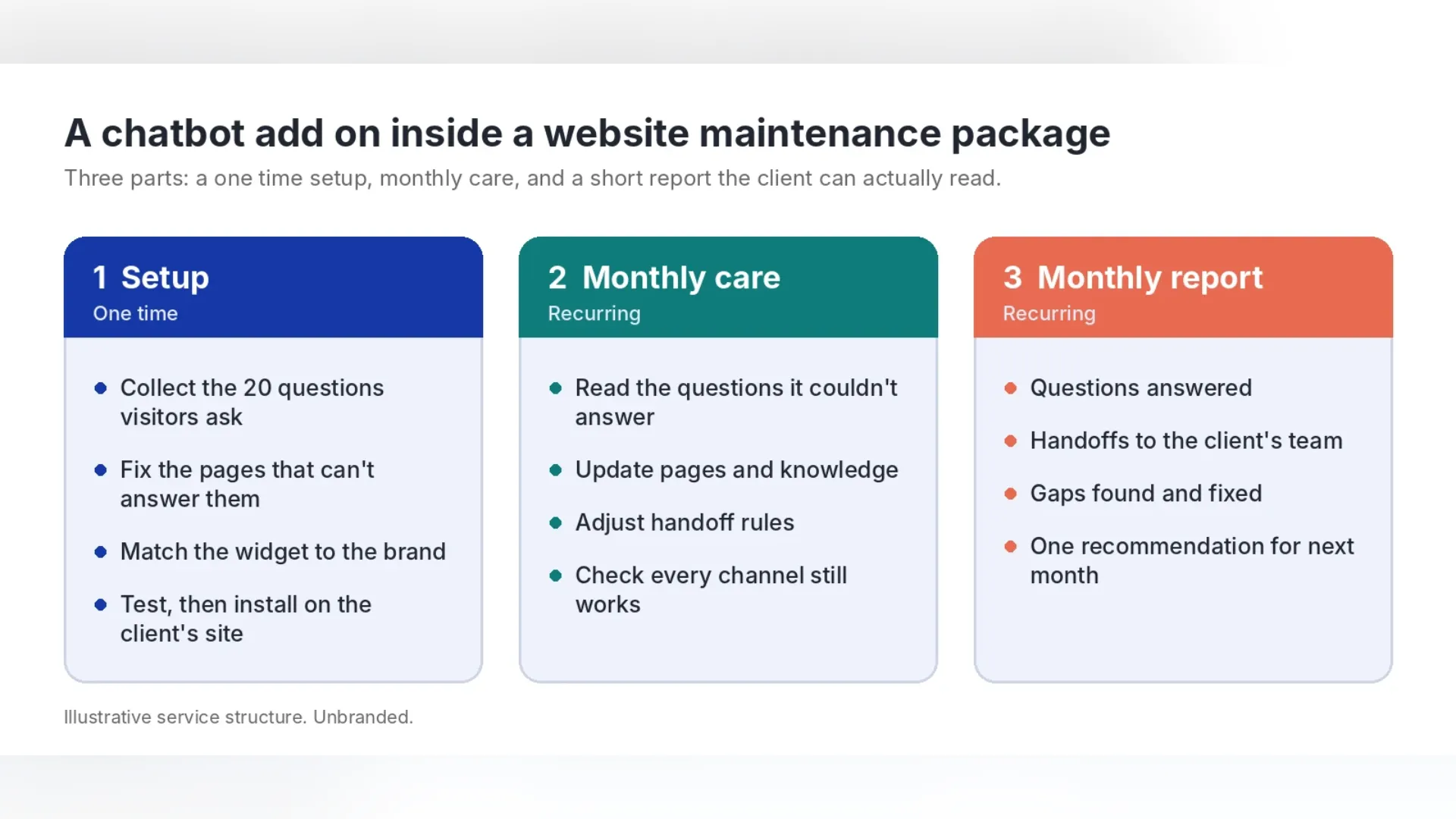
The setup
Start by collecting the 20 questions the client’s customers ask most. Check which ones the site answers clearly, and fix the pages that don’t. Then match the widget to the brand, load the content, and test it before it goes live. For most small business sites, this fits in a working afternoon.
The monthly care
Once a month, read the questions the assistant couldn’t answer. Each one is either a gap in the client’s content or a topic that should always go to a person. Update the pages, adjust the handoff rules, and check every channel still works.
The report
Keep it to one page: questions answered, handoffs to the client’s team, gaps you fixed, and one recommendation for next month. If the questions show what people want to know before they buy, that is also a brief for the next video. Clients renew what they can see.
What to charge: a worked example
Here is one way the numbers can work for a freelance editor, motion designer or small studio. Every figure is an assumption for illustration, not a market rate, and the client pays the chatbot platform directly, so these figures are your service income only.
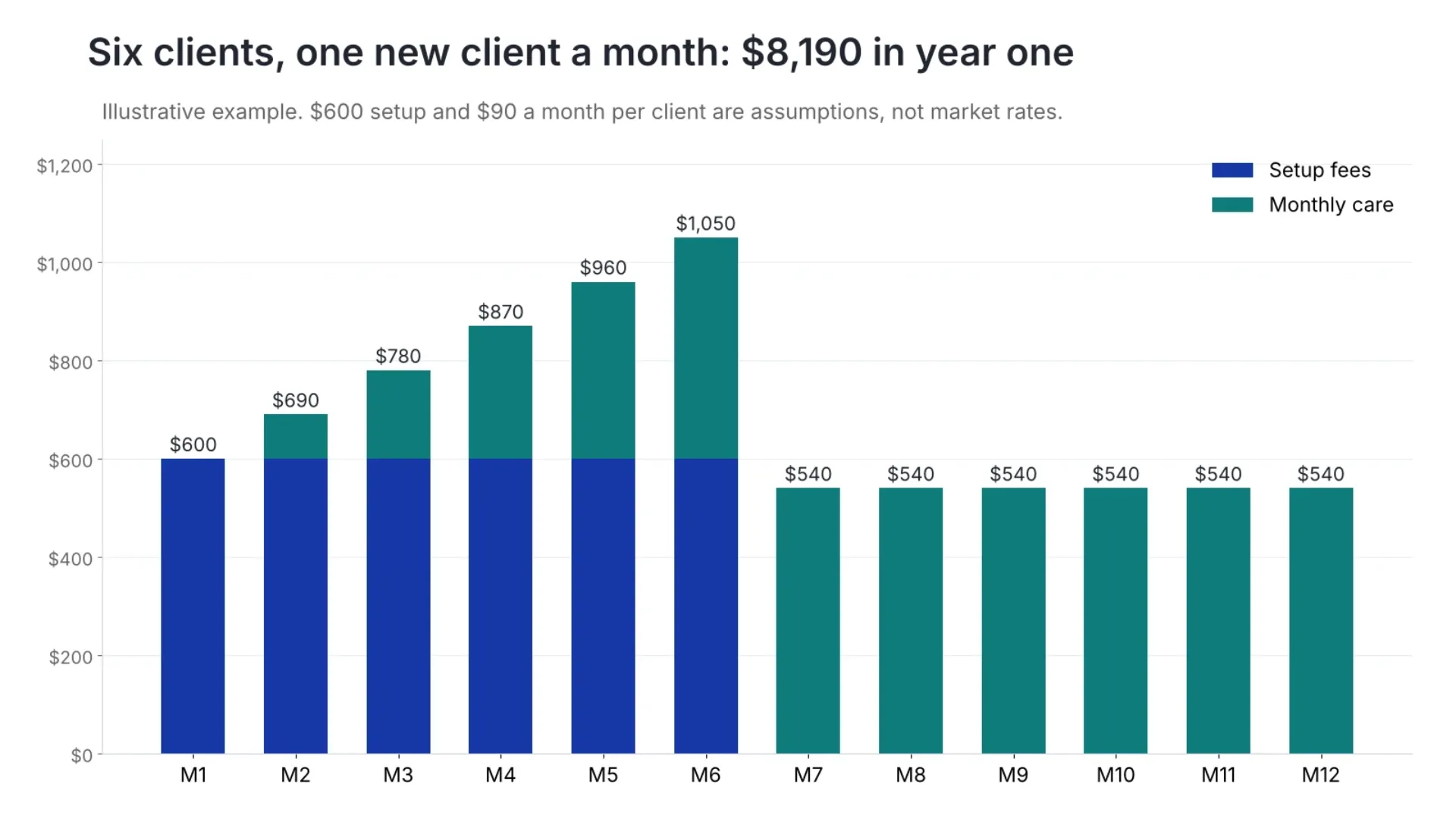
Year one: six setups bring in $3,600, and monthly care adds $4,590 as clients come on board, for $8,190 in total.
From month seven: six clients at $90 is $540 a month, or $6,480 a year, for about 4.5 hours of care work a month. That is roughly $120 an hour, and it repeats every month the clients stay.
The setup fee pays for your time. The care fee is the part that changes your business, because it grows with every client and doesn’t depend on landing the next shoot.
Designing the Widget Itself
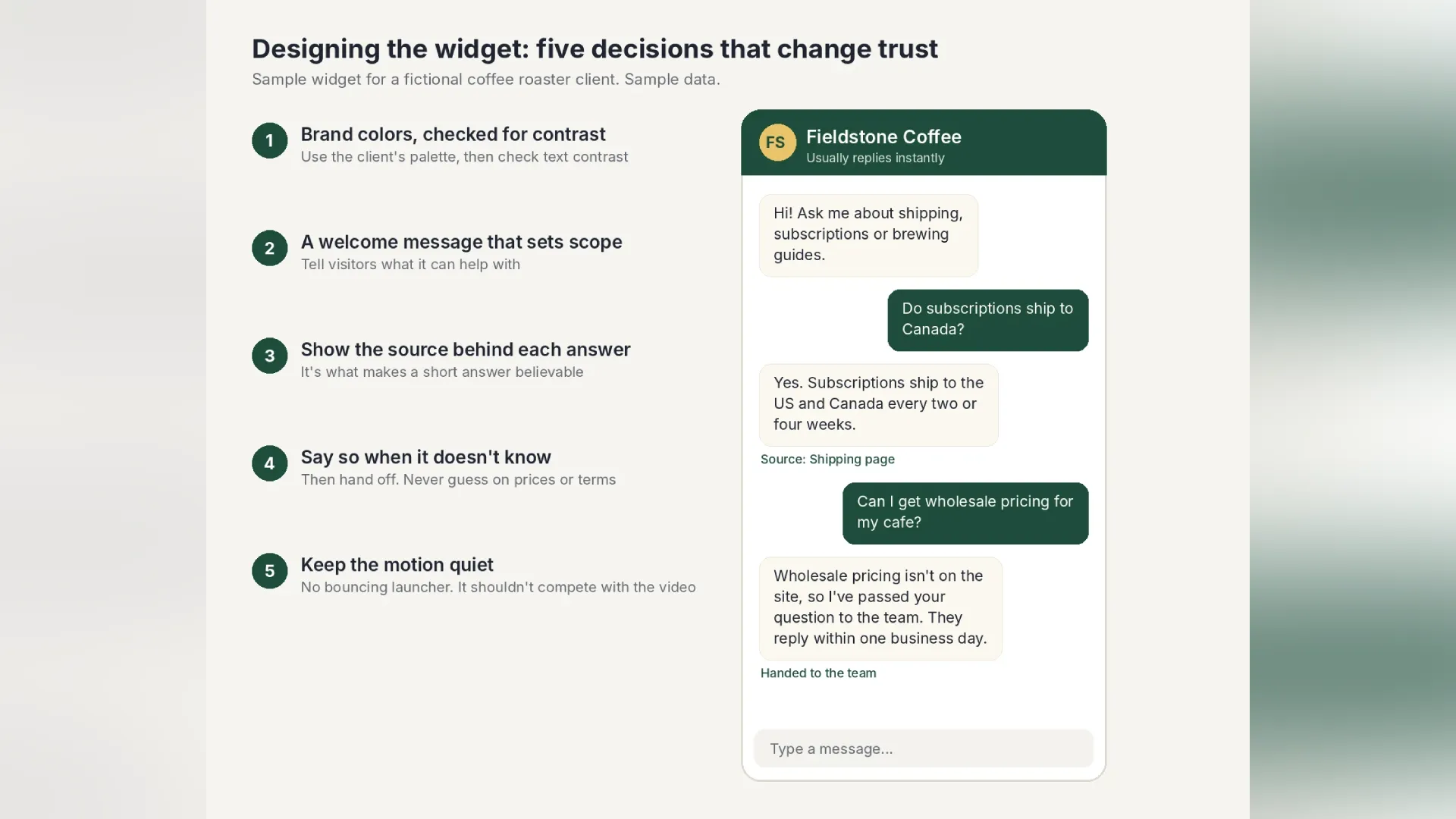
Use the brand palette, then check contrast
Brand colors first, but check the text inside the bubbles against the background. WCAG 2.2 sets a minimum contrast ratio of 4.5:1 for normal text, and chat text is small, often read on a phone, and often read in a hurry.
Write a welcome message that sets the scope
“Hi! Ask me about shipping, subscriptions or brewing guides” tells visitors what the assistant is for. “How can I help you today?” invites questions it may not be able to answer.
Keep the source visible
A short answer with the page it came from reads as trustworthy. The same answer with no source reads as a guess. Builders such as Agentency show the source under every reply, so this is a setting to keep on rather than something to design from scratch.
Keep the motion quiet
Motion designers will be tempted to animate the launcher. Resist most of that urge. A bouncing bubble next to a hero video splits attention, and the video should win. A short fade when the chat opens is plenty. WCAG 2.2 also expects a way to pause, stop or hide anything that moves on its own for more than five seconds alongside other content, so an attention loop on the chat bubble works against the page in more ways than one.
Place it where it doesn’t fight the layout
A corner placement works on most sites. Check it on mobile, where it can cover video controls, a sticky booking button or a cookie banner, and make sure it doesn’t open by itself and block the page.
What to Test Before Handover
Finally, send one test conversation through to the client’s inbox, so they see exactly what a handoff looks like before a real customer triggers one.
How Agentency Handles a Chatbot for Client Websites
Branded in minutes, without code
You name the agent, pick a template, and set the brand colors, logo or avatar, languages and widget position from one dashboard. Agentency describes this first step as taking about two minutes.
Trained on the client’s own content
You crawl the client’s site or sitemap, upload documents, connect Google Drive, OneDrive or Dropbox, or paste FAQs. The agent answers only from that material and shows the source behind every reply.
Installs on the client’s platform
There is an official WordPress plugin, and one script tag covers Wix, Squarespace, Webflow, BigCommerce, Ghost, Joomla, Drupal and plain HTML. You can also lock the widget to the client’s domains or share a hosted chat link.
One assistant across channels and languages
The same agent can answer on the client’s WhatsApp, Instagram, Messenger, Telegram and other channels, from one knowledge base, and it replies in the visitor’s language across more than 90 languages. For clients whose videos run on Instagram, that means the DMs the video triggers get the same answers as the website.
A monthly report almost writes itself
The dashboard lists every question, the answer given and its confidence, with a separate view of questions it couldn’t answer. Resolution and handoff rates, visitor ratings and team notes sit alongside, which covers most of the monthly report. Teammates are unlimited, with no per seat fees, so you and the client can both have access.
What This Comes Down To
Your video brought the visitors. You built the page, wrote half its content and know the brand better than anyone. Adding an assistant that answers from that work, and caring for it every month, is a natural service for any creative who already builds for clients. Next time a client asks if the website can answer questions at night, the answer is yes, and here is the price.
Agentency is an AI chatbot builder for businesses that want every customer question answered, day and night, without the guesswork. Teams add the documents and pages they already maintain, and the Agentency agent answers from that material only, with the source shown. When the answer is not there, it says so and hands the conversation to a person with the full transcript attached. One agent covers the website widget, WhatsApp, Instagram, Messenger, Telegram, Slack, and more than ten channels in total, and it replies in the visitor’s language. Businesses in ecommerce, real estate, restaurants, IT support, and internal knowledge use Agentency to answer, resolve, and sell around the clock.
About the Author
Disclaimer: This article is for general information only and is not financial or legal advice. The pricing example and sample widget are illustrative, and the fees shown are assumptions, not market rates. Agentency features are described as of November 2026.
Disclaimer : If you buy something through our links, we may earn an affiliate commission or have a sponsored relationship with the brand, at no cost to you. We recommend only products we genuinely like. Thank you so much.
Blog Label:

Write for us
Publish a Guest Post on Pixflow
Pixflow welcomes guest posts from brands, agencies, and fellow creators who want to contribute genuinely useful content.
Fill the Form ✏