AI Video Tools in 2026: The Complete Creator’s Guide to AI-Powered Editing
But here’s the thing: not all AI video tools are created equal, and the sheer volume of options makes it genuinely hard to know what’s actually worth your time. Text-to-video generators. Neural color engines. AI-assisted editors. Workflow intelligence platforms. They’re solving different problems, and choosing the wrong one for your workflow is an expensive mistake.
This guide is built for freelance video editors and motion designers who want to cut through the noise. We’ve organized 10 of the best AI video tools of 2026 into clear categories, explained what each one actually does well, and mapped out how to combine them into a workflow that makes sense. No fluff, no filler. Just the tools that are worth your attention.
The AI Shift That’s Changing Everything in 2026
The shift happened across three key areas. Text-to-video quality jumped dramatically, with models like Google Veo and Runway Gen-4.5 producing footage that holds up in real deliverables. AI within traditional editors like Premiere Pro and DaVinci Resolve stopped being gimmicks and became genuine workflow accelerators. And a new category of workflow intelligence tools, led by platforms like Descript and OpusClip, started handling the most time-consuming parts of post-production automatically.
As generative AI becomes more accessible, professionals no longer need extensive programming experience to build practical AI-powered solutions. Learning no code generative AI can help you understand how to create intelligent workflows, automate tasks, and develop AI applications using intuitive no-code platforms, making it easier to bring innovative ideas to life without writing complex code.
For freelance editors and motion designers, this means three practical things:
- You can generate B-roll and concept footage you couldn’t film or afford to license
- You can automate the repetitive editing tasks that used to eat entire afternoons
- You can deliver more output, faster, without scaling your team or your rates
The caveat? AI doesn’t replace creative judgment. It accelerates the execution of it. The editors and designers winning right now are the ones using AI for the mechanical work while keeping their creative instincts front and center.
How These 10 Tools Are Organized
Category 1: AI Video Generators create original video content from text, images, or prompts. Essential for concept visualization, custom B-roll, and cinematic effects work that no stock library can match.
Category 2: AI-Enhanced Professional Editors are the industry-standard DAWs and color suites that now include neural engines built directly into the timeline. These are your primary editing environments, made meaningfully faster.
Category 3: AI Workflow and Repurposing Tools speed up specific post-production tasks: transcript-based editing, social repurposing, content clipping, and footage enhancement. They slot into your existing pipeline rather than replacing it.
Each tool covers what it does best, who it’s for, free vs. paid options, and exactly where it earns its place in your stack.
Category 1: AI Video Generators
1. Runway Gen-4.5
Runway is the professional’s choice in AI video generation, and Gen-4.5 is a genuine leap forward. The model understands filmmaking concepts at a real level: camera choreography, timed beats, cinematic lighting. Your prompts can be written the way a director actually thinks, which makes the output predictable in a way earlier models weren’t.
For motion designers and VFX artists, the toolkit goes further than generation alone. The Aleph model lets you upload your own footage and transform it with text prompts: change the lighting, swap the weather, reframe the shot, replace a prop. It’s the kind of shot variety that used to require a second production day or an expensive VFX vendor.
Act Two is worth calling out specifically for character work. You direct a real performance on camera, upload it to Runway, and paste that performance into any AI character. The output handles full-body tracking including hands and fingers, which used to be the weakest link in AI character animation. The Academy resource library is also genuinely useful for learning the platform without wasted credits.
Pricing: Free plan with 125 credits (one-time). Standard at $15/month unlocks all models, 625 monthly credits, no watermark, and higher export quality.
Best fit in your workflow: Concept visualization, custom B-roll generation, VFX element creation, and branded content where generic stock footage simply won’t work.
2. Google Veo
Google Veo is the most reliable text-to-video generator available right now. Where other models drift from your prompt or hallucinate details, Veo 3.1 stays close to your instructions with impressive consistency, especially when you combine image references with text prompts.
The dialogue and lip-sync rendering is a standout in 2026. Type what you want your characters to say in the prompt, and the model generates matching audio automatically without extra configuration. For freelancers doing brand or commercial work, this makes quick concept tests and client previews genuinely practical in a way they weren’t before.
Access is primarily through Google Flow for content creators and Google Vids for workspace users. The footage holds up well across complex scenes, though Veo performs at its best when you break ambitious projects into simpler segments rather than trying to generate a long, scene-heavy clip in one pass.
Pricing: 100 free credits/month. Google AI Pro at $19.99/month for 1,000 credits (watermarked output). Google AI Ultra at $249.99/month removes watermarks and greatly increases limits.
Best fit in your workflow: Client pitch concepts, fast B-roll generation, creating custom characters or environments that don’t exist in any stock library.
Category 2: AI-Enhanced Professional Editors
3. Adobe Premiere Pro with Firefly AI
If you’re already in the Adobe ecosystem (and most professional freelancers are), Premiere Pro’s Firefly integration has made the platform meaningfully faster in 2026. The improvements aren’t flashy, but they compound: Generative Extend fills gaps in your timeline when a clip is just a second too short, Content-Aware Fill removes unwanted objects cleanly, and Auto Reframe handles aspect ratio conversion for multi-platform delivery without manual keyframing.
The Speech-to-Text captioning is now accurate enough to use in client deliverables without heavy correction. For editors handling long-form interviews or documentary-style work, this step alone saves hours per project.
For motion designers, the integration across After Effects, Photoshop, and Frame.io matters. AI-assisted rotoscoping and masking in After Effects, combined with Premiere’s editorial tools, creates a more fluid pipeline from design to final delivery. The real value is compound: each individual AI feature saves a little time, and across a full project those savings are substantial.
Pricing: $22.99/month (single app) or $59.99/month (Creative Cloud All Apps). No free tier, but the professional feature set justifies the cost for full-time freelancers.
Best fit in your workflow: Your primary timeline for professional client projects, multi-platform content delivery, and motion graphics pipelines that run across Premiere and After Effects.
4. DaVinci Resolve 19
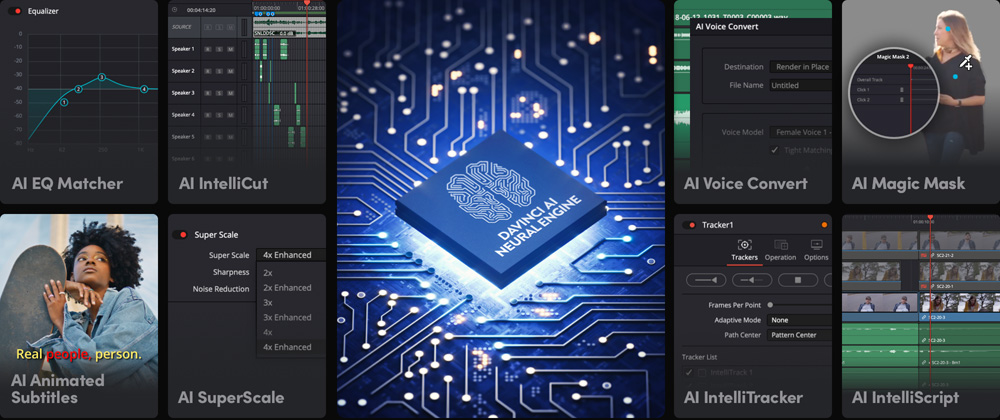
DaVinci Resolve 19 remains the most generously free professional tool in the industry. The free version includes a neural engine that handles object removal, face refinement, depth mapping, voice isolation, and smart reframe without a monthly fee. For VFX artists and colorists, that’s a remarkable starting point.
The Magic Mask is worth highlighting specifically. Point at a subject, and Resolve’s AI isolates and tracks it through the clip automatically. What used to require hours of manual rotoscoping now takes minutes. Combined with the world-class color science that Resolve has always offered, this makes it an essential tool for any editor or motion designer doing serious finishing work.
The Studio version at $295 is a one-time purchase, not a subscription. It adds AI noise reduction, HDR magic, film grain tools, and collaboration features, making it genuinely competitive with monthly subscription software for long-term value. If you’re going to pay for one tool this year as a one-time purchase, this is the one.
Pricing: Free (remarkably capable for professional work). Studio at $295 one-time purchase.
Best fit in your workflow: Primary color grading environment, AI-assisted rotoscoping and masking, and professional finishing for any project where color accuracy is non-negotiable.
5. Invideo
Invideo combines a browser-based multitrack editor with AI agents that work directly on the timeline. Its standout capability is rough-cut editing. Upload your raw footage, explain the story or structure you want, and the agent reviews the action and dialogue, selects usable takes, removes unusable material, and assembles an editable first cut.
This is especially useful for interviews, podcasts, product videos, multicamera shoots, and other projects where reviewing footage takes longer than making the creative decisions. The agent can follow a script, arrange clips around a music track, sync camera angles, adjust pacing and duration, or create shorter versions from an existing edit.
The result remains on an editable timeline instead of arriving as a locked output. You can inspect the agent’s choices, replace takes, rearrange scenes, refine the audio, and finish the edit manually. For freelance editors, this reduces the repetitive first-pass workload while leaving the story, pacing, and final polish in their hands.
Pricing: The editor is available through Invideo’s credit-based plans. Timeline editing and professional color, audio, and 3D tools are included, while access to agents and generative models varies by plan.
Best fit in your workflow: Turning large amounts of raw footage into an editable first cut before the editor takes over the story, pacing, sound, and finishing work.
6. Async
Async is an AI-powered video editor designed to make video production, editing, and content repurposing more efficient. It brings video editing tools and AI-powered features together in one platform, helping creators and marketing teams turn raw footage into polished content without relying on multiple applications. Whether you’re preparing videos for social media, creating marketing materials, or adapting existing footage for different platforms, Async offers tools to streamline the editing process.
One of its key features is Async Intelligence, which enables users to refine videos through chat-based instructions. Instead of relying entirely on manual adjustments, creators can use conversational prompts to make changes and develop their content. Async also offers AI Clips, which help transform longer videos into shorter clips suitable for social media and other short-form content channels. Additional features, including AI subtitles and AI Reframe, help users prepare videos for different viewing formats and audiences.
Another advantage is access to 100+ AI models, giving users more flexibility when generating video content and exploring different creative approaches. By combining AI video generation with editing capabilities, Async supports more of the content creation workflow in one place. This makes it a useful option for creators who regularly publish videos, marketers producing promotional content, and teams looking to simplify their video production process.
Pricing: Check the website for the latest plans and pricing.
Best fit in your workflow: AI-assisted video editing, short-form content creation, repurposing long videos into social media clips, adding subtitles, adapting videos to different aspect ratios, and refining content with chat-based editing tools.
Category 3: AI Workflow and Repurposing Tools
7. Descript
Descript’s core idea is still one of the most genuinely clever things in video software: edit the transcript, and the video updates automatically. Delete the word “um,” and that moment disappears from the clip. Rearrange sentences, and the cut follows. For freelancers editing interviews, testimonials, podcasts, or training content, this is a fundamentally faster way to handle a first pass.
The Overdub feature is worth noting for client work. If your subject misspoke a key line, you type the correction, and Descript generates the audio in their voice without scheduling a re-record. Studio Sound does one-click background noise removal that genuinely works, which means audio recorded in a less-than-ideal environment becomes usable without a separate audio post step.
Descript isn’t a full NLE replacement, and it’s not trying to be. As a first-pass efficiency layer for dialogue-heavy content before you take it into Premiere or Resolve for finishing, it’s excellent.
Pricing: Free plan with 1 hour of transcription per month. Hobbyist at $24/user/month removes watermarks and adds higher export quality.
Best fit in your workflow: First-pass editing for interviews, podcasts, and talking-head content before final finishing in your primary editor.
8. CapCut Pro
CapCut is genuinely useful for freelancers who deliver social content as part of their service offering. The auto-captions are accurate and styleable, background removal works without green screen, and auto-reframe handles vertical and square conversions cleanly for Reels, TikTok, and Shorts.
The free tier is more capable than most tools charge for, which makes it a smart starting point for clients who need social deliverables alongside longer content. Beat sync, AI styling tools, and text-to-speech round out a feature set that’s hard to beat at the price point.
For motion designers, CapCut won’t replace After Effects for complex work. But for social versions of branded content or quick client-facing previews, it’s a fast and reliable option. Think of it as your rapid deployment tool for anything under 60 seconds.
Pricing: Free (with watermark on exports). Pro at $7.99/month removes the watermark and unlocks premium features.
Best fit in your workflow: Social content delivery, quick preview generation, and repurposing longer edits into Shorts, Reels, and TikTok format.
9. OpusClip
OpusClip is built for one job, and it does it well: take a long video and identify the moments worth clipping. The AI scores segments based on engagement potential, creates vertical crops that keep the speaker centered, adds captions, and outputs multiple clip candidates ranked by predicted performance.
For freelancers working with clients who have YouTube channels, podcasts, or webinar libraries, this unlocks a significant service opportunity. One two-hour recording can become a month of social content with minimal manual work. The AI selections aren’t always perfect, but the time savings on discovery alone make it worthwhile. You’re reviewing and approving, not hunting.
Multi-speaker tracking handles interview and panel content well, which is important because that’s usually the format with the most raw footage to process.
Pricing: Free plan with monthly credits and watermark. Starter at $15/month removes watermark and unlocks advanced clip scoring.
Best fit in your workflow: Social repurposing pipelines for clients with long-form content libraries, or building your own content distribution strategy from longer videos.
10. Topaz Video AI
Topaz Video AI is the tool motion designers and VFX artists reach for when they need to make footage look better than it was shot. The AI upscaling is genuinely impressive: SD footage can be taken to HD, and 1080p can be pushed to 4K with detail preservation that competing tools can’t match.
For freelancers working with archival footage, older client assets, or low-quality source material, Topaz turns what would otherwise be unusable clips into production-ready content. The noise reduction, motion deblur, and frame interpolation for smooth slow-motion from non-slow-motion footage are all best-in-class in their respective categories.
This isn’t a tool for generating content. It’s a tool for making your existing content significantly better, which makes it a quiet but essential part of any high-quality finishing workflow.
Pricing: $299 one-time purchase (no subscription). Free trial available.
Best fit in your workflow: Final enhancement pass, archival footage restoration, upscaling client-provided assets, and creating high-quality slow-motion from standard-rate footage.
10 AI Video Tools at a Glance
Building Your AI Video Workflow
For Freelance Video Editors
A strong AI-assisted freelance workflow in 2026 looks something like this:
Start with Descript for any dialogue-heavy content: interviews, testimonials, talking-head pieces. Use it for a fast first pass to remove dead air and filler words, and pull the rough structure from the transcript. This step alone cuts first-pass editing time significantly on long recordings.
Take that into Adobe Premiere Pro for final timeline work, color correction, and multi-platform delivery. Use Firefly’s Generative Extend when you need a clip to breathe a little longer, and Auto Reframe for social versions. Captions from Speech-to-Text handle accessibility without a separate step.
For B-roll gaps, feed a prompt into Google Veo or Runway depending on the aesthetic. Veo gives you cleaner, more photorealistic results. Runway gives you more creative control and cinematic character. Use Topaz Video AI on any client-supplied footage that needs to be brought up to delivery standard before it hits your timeline.
For social deliverables, run the final export through OpusClip to pull clips for the client’s social channels, then polish and publish via CapCut Pro.
For projects that need narration or voiceover without a full recording session, Pixflow’s AI Voiceover tool integrates naturally into this stack. It generates high-quality narration from your script, saving studio time and budget on shorter deliverables where hiring a voice artist isn’t in the scope.
For Motion Designers and VFX Artists
The motion design and VFX workflow leans harder on generation and enhancement.
Runway Gen-4.5 becomes your concept and visualization layer. Use it to pre-visualize shots that will later be composited or motion-tracked, generate texture and element references, or produce atmospheric B-roll that would otherwise require expensive stock licensing. The Aleph transformation model is especially useful for taking client reference footage and experimenting with visual treatments before committing to a direction.
DaVinci Resolve 19 handles all color and finishing work. The Magic Mask makes isolation and selective grading dramatically faster, and the Fusion compositor handles VFX integration. For most motion design projects, the free version covers everything you need without a monthly commitment.
Adobe After Effects remains the industry standard for complex motion graphics. The AI-assisted roto tools and Firefly integration speed up the repetitive masking and cutout work that used to be the most grinding part of any compositing project. If you’re on Creative Cloud already, you’re getting this for free.
Topaz Video AI handles the enhancement pass on any footage that needs it, particularly when you’re working with client-supplied assets or archival material that wasn’t shot to spec.
For sound design, which often gets underweighted in motion design projects: a strong sonic layer transforms the perception of visual quality dramatically. Pixflow’s SFX library gives you production-ready sound effects built specifically for motion design and video work, covering cinematic impacts, UI sounds, ambient textures, and more. Adding the right sound effect at the right moment is one of the fastest ways to elevate a project from technically correct to genuinely memorable.
The Right Stack vs. the Wrong One
For most freelancers and motion designers, the core daily stack looks like this:
- Primary editor: Premiere Pro or DaVinci Resolve (pick one as your home base)
- Generation tool: Runway or Google Veo (based on project aesthetic)
- Workflow tool: Descript for dialogue content, CapCut Pro for social content
- Enhancement: Topaz Video AI for quality-critical finishing
OpusClip fits in when you have a repurposing component in the deliverables. The rest are project-specific tools, not daily-use ones.
Keep your stack tight and your workflow fast. The editors getting the most out of AI in 2026 aren’t the ones using the most tools. They’re the ones who’ve identified exactly where AI removes friction in their specific work and built repeatable systems around those moments.
Conclusion
The best freelancers and motion designers right now have identified exactly where AI removes friction in their workflow and built tight systems around those moments. That might be Descript cutting your first-pass dialogue editing time in half. It might be Runway handling B-roll so you’re not stuck licensing generic stock. It might be Topaz making a client’s archival footage usable when it would otherwise have been cut from the project.
The tools are here. The workflow is yours to build. And when you’re ready to complete your project with production-ready sound, Pixflow’s SFX library has you covered with motion-design-ready sound effects built for exactly the kind of work you’re doing. (Your timeline will thank you.
Disclaimer : If you buy something through our links, we may earn an affiliate commission or have a sponsored relationship with the brand, at no cost to you. We recommend only products we genuinely like. Thank you so much.



Write for us
Publish a Guest Post on Pixflow
Pixflow welcomes guest posts from brands, agencies, and fellow creators who want to contribute genuinely useful content.
Fill the Form ✏