How Creative Teams Can Use Gantt Charts to Manage Complex Production Workflows

- From a Creative Brief to a Finished Deliverable
- When One Task Affects Another
- When Important Decisions Shape the Schedule
- When a Delay Ripples Through Production
- When the Final Deadline Is Fixed
- When People and Resources Are Shared
- When Feedback Changes the Plan
- A Production Workflow the Team Can See
The same is true for larger creative projects. A campaign can involve several videos, social assets, graphics, and different teams working toward one launch date. The work rarely moves in a straight line, either. A delayed shoot can push back editing, a change to the edit can affect motion graphics and sound, and a late client review can create another round of revisions.
When all of this is tracked through separate task lists, messages, and spreadsheets, it becomes harder to understand how the pieces fit together. A Gantt chart offers a different view: it puts the production on a timeline and shows how the work is connected.
In this article, we will use a product video workflow as an example to explore how Gantt-based planning can help creative teams manage complex production processes.
From a Creative Brief to a Finished Deliverable
For a product video, that might mean moving from scriptwriting and storyboarding to filming, editing, motion graphics, sound design, review, and final delivery. A larger campaign could have several of these sequences running at the same time.
A Gantt chart represents this work as tasks on a shared timeline. Each task has a duration and a position in the schedule, so the team can see how much time has been allocated to each stage and what the overall production is expected to look like.
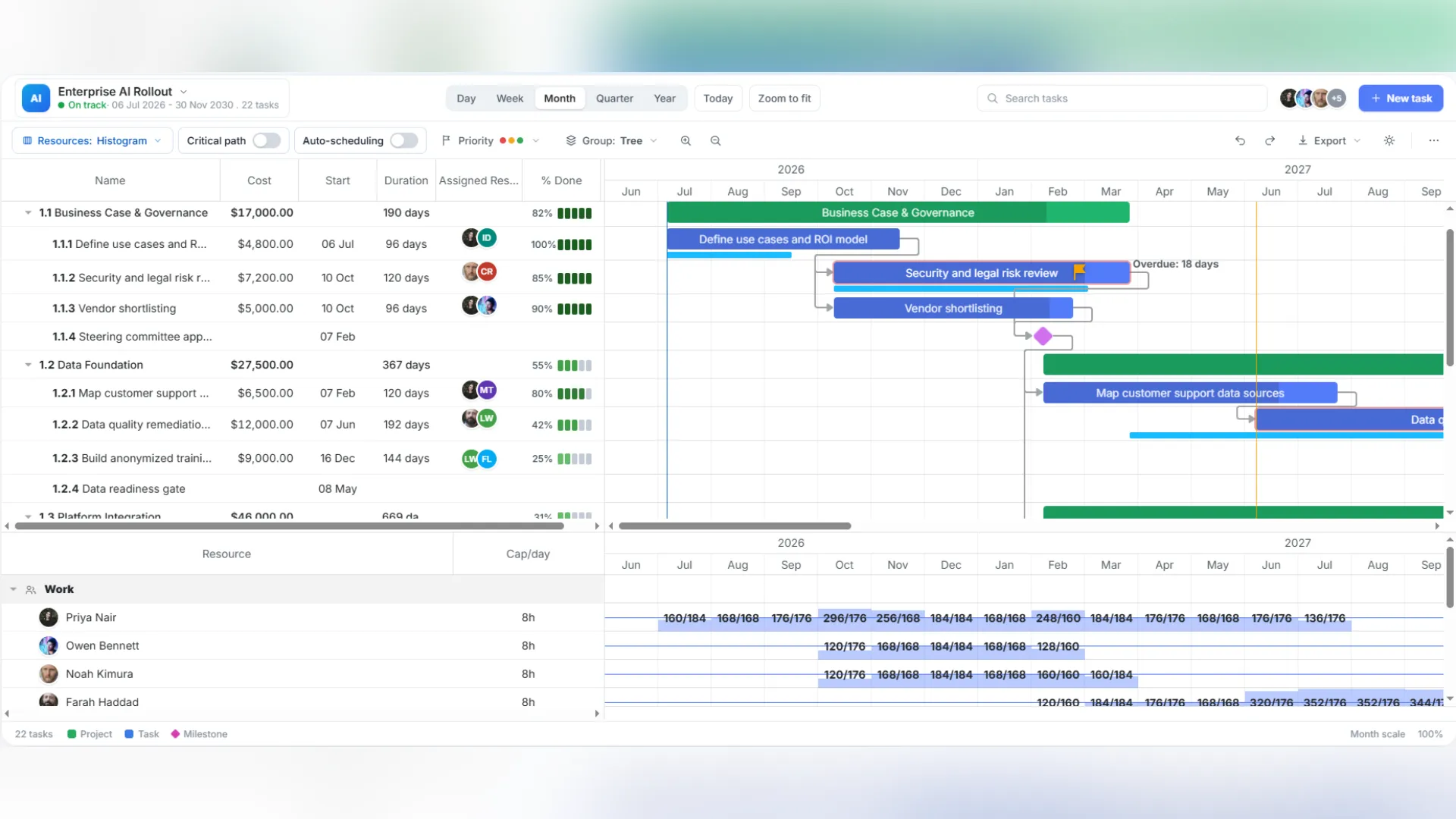
For the creative team using the finished application, the result is simply a clearer view of the production. The more complicated the project becomes, however, the timeline needs to show more than dates and durations.
When One Task Affects Another
This matters when the schedule changes. If filming moves from Monday to Thursday, the producer needs to know what else is affected. A schedule with dependencies can make those relationships visible instead of requiring someone to check every downstream task manually.
The same approach works for creative approvals. A visual-effects task might depend on an approved storyboard, while final export could depend on both the completed edit and sound mix. The timeline becomes a representation of how the work actually moves through the production.
When Important Decisions Shape the Schedule
Script approval, the end of filming, a rough-cut review, picture lock, and final client sign-off are good examples. These moments can be highlighted on the timeline as milestones, giving the team clear checkpoints throughout the production process. That makes the schedule easier to read. A producer looking at a campaign timeline can immediately see where a major approval is expected and how much work remains afterward.
Milestones can also connect several deliverables to the same launch. A campaign might have separate approval points for the main video, social clips, and supporting graphics. They may follow different production paths, but the milestones show how they fit into the larger plan.
When a Delay Ripples Through Production
With auto-scheduling, the application can use the relationships between tasks to recalculate affected dates when something changes. If editing depends on filming, for example, moving the filming date gives the team a clearer picture of how the rest of the schedule may need to change.
The production team still decides which relationships make sense. The software isn’t deciding how the project should run. It is applying the scheduling rules that the team has already defined.
That distinction becomes increasingly useful as a production grows. A schedule with dozens of activities can be managed manually; a schedule with hundreds of connected tasks becomes much harder to maintain that way.
When the Final Deadline Is Fixed
Critical path analysis helps with this by identifying the sequence of dependent activities that determines the overall project duration. If one of those activities takes longer than planned, the delivery date may also move unless the team finds a way to recover the lost time.
For the product video, the critical path could run through filming, editing, picture lock, sound mixing, client approval, and final delivery. Other work may happen in parallel without changing the final deadline. That gives producers a better basis for deciding where schedule changes deserve immediate attention.
Resource management brings these assignments into the planning picture. Instead of looking only at when a task should happen, the producer can see which people or resources need to be available for it.
This is particularly useful for agencies and larger creative teams running several productions simultaneously. Moving an assignment may solve a deadline problem for one project while creating an availability problem for another. Seeing those commitments together makes it easier to spot conflicts before they affect the production.
When Feedback Changes the Plan
An interactive Gantt chart allows the schedule to change with the project. Tasks can be moved, durations adjusted, dependencies updated, and new activities added without creating a separate planning document every time something changes. That keeps revisions visible in the same place as the original plan. If an additional review round is added, the team can see what it requires and what comes after it. If a task takes longer than expected, its effect on the rest of the production can be evaluated immediately.
The timeline stops being a fixed description of how the project was supposed to happen and becomes a working view of how it is actually progressing.
A Production Workflow the Team Can See
Starting with a simple timeline, the schedule can grow to include dependencies, milestones, automatic rescheduling, critical-path analysis, and resource assignments as the project requires more coordination. Interactive editing then allows the same plan to keep up with the changes that inevitably happen during production.
For a creative team, that means the production schedule becomes more than a list of deadlines. It becomes a shared picture of the work, the people involved, the decisions still ahead, and the changes that could affect final delivery.
Disclaimer : If you buy something through our links, we may earn an affiliate commission or have a sponsored relationship with the brand, at no cost to you. We recommend only products we genuinely like. Thank you so much.
Blog Label:



Write for us
Publish a Guest Post on Pixflow
Pixflow welcomes guest posts from brands, agencies, and fellow creators who want to contribute genuinely useful content.
Fill the Form ✏